So What Is OAuth? A Deep Dive into OAuth 2.0 and PKCE
A practical deep dive into OAuth 2.0, covering why it exists, its core roles, the authorization code flow, access tokens, and PKCE.
Content
- Why We Need OAuth
- The Roles of OAuth 2.0
- Client Types
- OAuth 2.0 Authorization Code Flow
- PKCE (Proof Key for Code Exchange)
- Summary
- References
This article references many OAuth-related RFCs and Best Current Practice documents, and I will link to the relevant specifications whenever possible.
A few details and recommendations come from newer guidance, especially RFC 9700 - Best Current Practice for OAuth 2.0 Security. I will also cover PKCE, which is defined in RFC 7636 and is now part of modern OAuth security practice.
This is a detailed walkthrough of OAuth 2.0 and the authorization code flow, so it may take more than 20 minutes to read. If you find it helpful, feel free to share it. Thanks!
Why We Need OAuth
Before OAuth, if an app wanted access to data from services like Google or Facebook, one ugly pattern was to ask users for their email address and password directly, log in on their behalf, and then scrape or fetch the data from there.
That was not just awkward. It was a terrible security model.
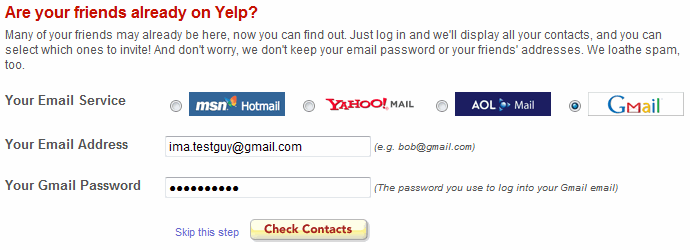
Still, it happened. Even when companies explicitly told developers not to do it, users usually did not care. They just wanted to import their friends, contacts, or profile data as quickly as possible.
That was the environment OAuth came out of. In 2006, the initial idea was proposed by Blaine Cook, who was at Twitter at the time. DeWitt Clinton from Google joined the discussion, and Eran Hammer later had a major influence on the early drafts.
After several rounds of discussion, OAuth 1.0 was published as RFC 5849 in April 2010. It is an Informational RFC rather than a Standards Track RFC. Two years later, after more developer feedback, OAuth 2.0 was published as RFC 6749 in October 2012. It moved away from OAuth 1.0’s signature-heavy design and became widely adopted, though later RFCs and best current practice documents were needed to tighten security and interoperability guidance.
Since OAuth 1.0 is mostly historical at this point, everything below refers to OAuth 2.0 unless I say otherwise.
OAuth 2.0 became so widely used that a long list of follow-up RFCs had to be published to patch security gaps, define extensions, and make the ecosystem more usable in real systems. That is why the OAuth spec family now feels a bit like a maze.
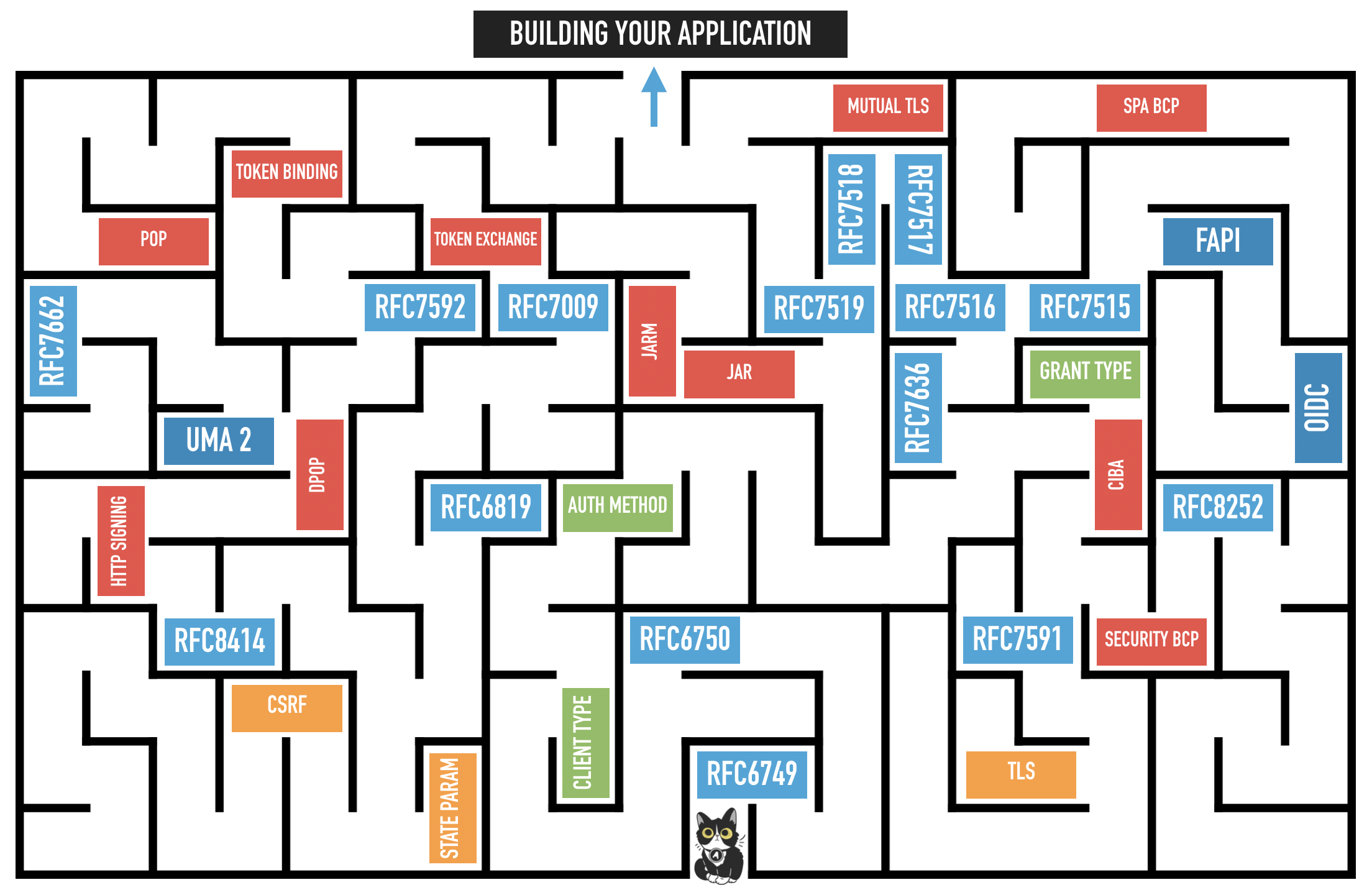
Image source: Lee McGovern, “OAuth 2.1: How Many RFCs Does it Take to Change a Lightbulb?”
As of 2026-04-24, OAuth 2.1 is still being standardized rather than published as an RFC. If you want to follow its progress, the best place to check is the IETF draft page for draft-ietf-oauth-v2-1.
The Roles of OAuth 2.0
Before looking at the full flow, we need to understand the roles defined in Section 1.1 of RFC 6749.
To make this easier to picture, let us use a simple example. Imagine you have a Google account called yorukot, and you want to let a Microsoft application such as Outlook access yorukot’s Gmail data.
With that setup, the roles become much easier to see.
Resource Owner
The resource owner is the party that can grant access to a protected resource. In most cases, this is a person, though it does not have to be.
In this example, you are the resource owner.
Resource Server
The resource server hosts the protected data. In this case, Google is holding your Gmail data.
The resource server protects that data and only serves it when the client presents a valid access token.
Client
The client is the application that wants to access your data. In this example, that is the Microsoft application.
This is one point that trips people up, “client” here does not mean the browser or the user’s device. It means the application that wants access to the resource owner’s data.
Authorization Server
The authorization server is the component that authenticates the resource owner when needed, obtains an authorization decision, and issues tokens to the client.
One thing that often confuses people is that the authorization server is not the same thing as the resource server. In many real systems they are backed by the same company, and from the outside they may even look like one product, but conceptually they are different roles.
If you want a simple mental model, think of them as two services:
- one service handles authorization
- one service serves protected resources
Client Types
OAuth 2.0 defines two client types based on whether the client can authenticate securely with the authorization server.
Confidential Client
A confidential client can authenticate securely with the authorization server. In practice, that usually means it can safely store a client_secret.
Most confidential clients have a backend server, which gives them a private place to store credentials and perform the token exchange.
This is the main client type I focus on in this article.
Public Client
A public client cannot authenticate securely with the authorization server. A mobile app or browser-based app is the classic example, because users can inspect the app and recover anything baked into it.
That does not mean the app is automatically insecure. It means you cannot trust it to keep long-term secrets like a client_secret.
Also, the client_id is not a secret. It identifies the client, but it does not authenticate the client by itself.
To improve security for public clients, OAuth uses RFC 7636 - PKCE (Proof Key for Code Exchange). I will come back to PKCE later.
OAuth 2.0 Authorization Code Flow
This article focuses on the OAuth 2.0 authorization code flow, which is defined in Section 4.1 of RFC 6749. OAuth 2.0 includes other flows too, but this is the one you will see most often in modern systems.
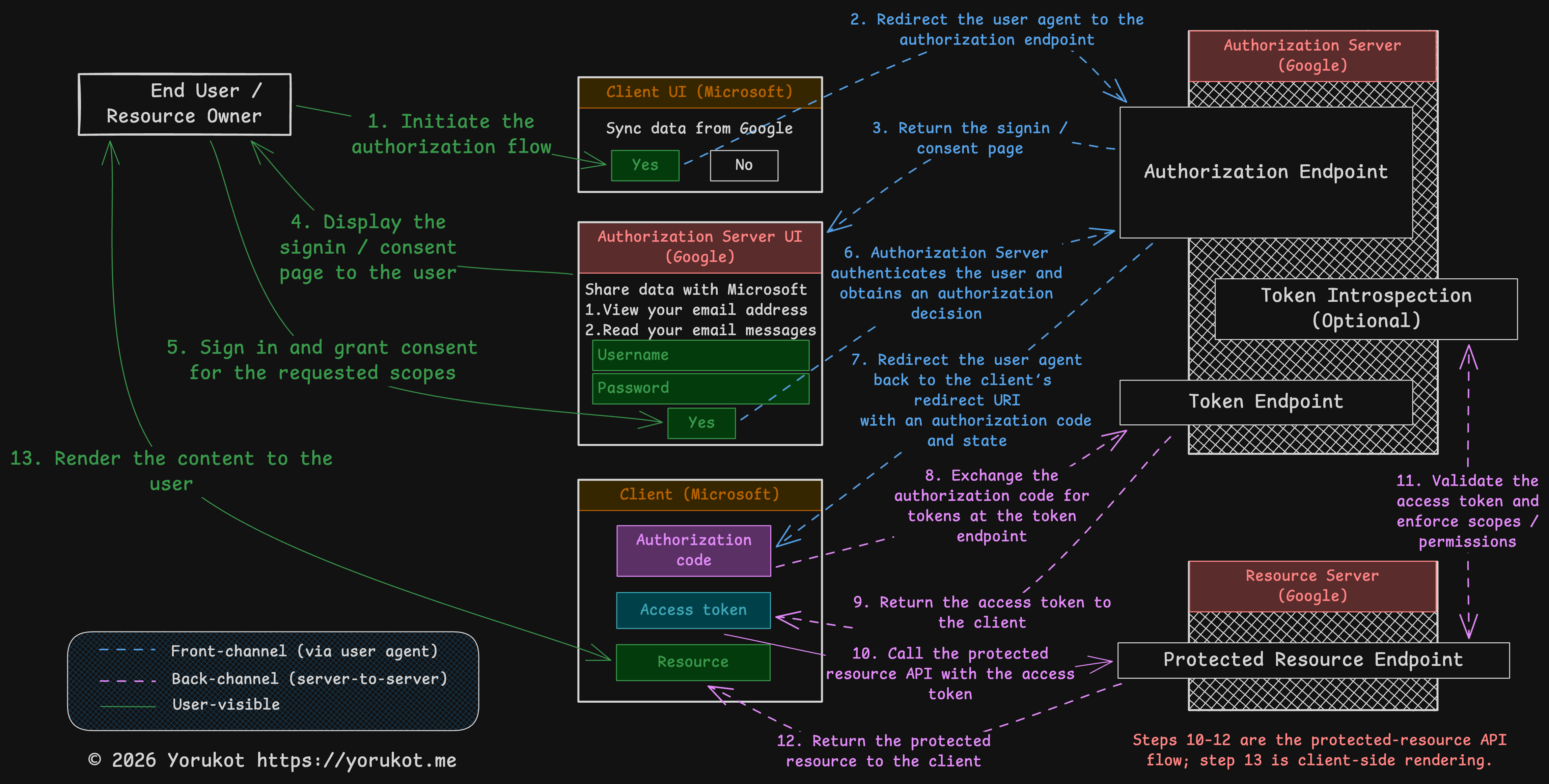
I also attached the Excalidraw file for this diagram here: oauth-flow.excalidraw. You can open it in Excalidraw and edit it if you want.
Google and Microsoft appear in the diagram only to make the story easier to follow. They are just examples.
If you want to experiment while reading, the OAuth 2.0 Playground is a good companion tool.
0. Client Registration
Before any OAuth flow can start, the client must register with the authorization server. During registration, the authorization server assigns a client_id and records client metadata such as allowed redirect_uri values. A client_secret or other client credentials may be issued if applicable.
| Parameter | Description |
|---|---|
client_id | The identifier used to recognize the client. |
client_secret | A secret used by confidential clients to authenticate themselves. |
redirect_uri | One or more pre-registered callback URIs that the authorization server is allowed to redirect to. |
OAuth 2.0 itself describes client registration at a high level in Section 2 of RFC 6749. There is also a separate specification for dynamic client registration: RFC 7591.
1. Initiate the Authorization Flow
This is the point where the user tells the client, “I want to connect my account.”
That might happen because the user clicks a button in the UI, submits a form, or triggers some other action. The RFC does not define this part. It simply assumes the client provides some way to start the flow.
2. Authorization Endpoint
At this step, the client redirects the user’s browser to the authorization server’s authorization endpoint.
The request usually looks like this:
GET {authorization_endpoint}?
  response_type=code
  &client_id={client_id}
  &redirect_uri={redirect_uri}
  &scope={scope}
  &state={state}
In modern deployments, authorization code requests usually also include PKCE parameters such as code_challenge and code_challenge_method. We will cover PKCE later, so for now just keep these parameters in mind. Because this endpoint handles the user’s login and consent flow, it must be protected with HTTPS/TLS.
Let us walk through the important parameters.
Response Type
The response_type tells the authorization server what the client wants back.
| Response Type | Description | RFC Reference |
|---|---|---|
code | Requests an authorization code. | Section 4.1 of RFC 6749 |
token | Requests an access token directly via the implicit flow. The implicit grant is deprecated in current best practice, so new clients should generally avoid it. | Section 4.2.1 of RFC 6749 |
| registered extension value | Extensions can define additional response types. | Section 8.4 of RFC 6749 |
Reference: Section 3.1.1 of RFC 6749
Client ID
The client_id comes from client registration. It tells the authorization server which client is making the request.
Reference: Section 2.2 of RFC 6749
Redirect URI
The redirect_uri also comes from client registration. It tells the authorization server where to send the user after the authorization step is finished.
This needs to be controlled carefully. If an attacker can trick the authorization server into redirecting to a malicious URI, they may be able to steal authorization data.
OAuth 2.0 originally allowed some flexibility here, but current best practice is much stricter. Section 2.1 of RFC 9700 requires authorization servers to use exact string matching when comparing a client’s redirect URI against pre-registered redirect URIs, except for the port component of loopback localhost URIs used by native apps.
Reference: Section 3.1.2 of RFC 6749
Scope
The scope parameter defines what the client is asking to do with the user’s data.
Scopes are strings defined by the authorization server. For example, a client might want to read the user’s avatar and email while also being able to edit the user’s profile. In that case, the scope string might look like this:
user_avatar_read user_email_read user_profile_write
When that value is placed in a URL, the spaces are typically URL-encoded. In many examples you will see them represented with +, like this:
user_avatar_read+user_email_read+user_profile_write
Reference: Section 3.3 of RFC 6749
State
The state value ties the original authorization request to the callback that comes back later in Step 7.
The client should generate a fresh value, store it, and verify it when the user returns. If you skip that step, you leave yourself open to CSRF-style attacks.
Reference: Section 10.12 of RFC 6749
3-6. User Authentication and Consent
Once the authorization server receives the authorization request, it needs to make sure two things are true:
- the user is really who they claim to be
- the user actually agrees to grant the requested access
In many consumer-facing systems, the authorization server typically shows pages that let the user:
- log in if they are not already authenticated
- review which app is requesting access
- review which scopes or resources are being requested
- approve or deny the request
After that, the authorization server has authenticated the user as needed and obtained an authorization decision. In some deployments, that decision comes from an explicit consent screen. In others, it may come from prior consent, enterprise policy, or another deployment-specific mechanism.
Reference: Sections 4.1.1 and 4.1.2 of RFC 6749
7. Redirect to Callback Endpoint
If the user approves the request, the authorization server redirects the browser back to the client’s callback endpoint.
For the authorization code flow, it looks like this:
GET {redirect_uri}?
  code={code}
  &state={state}
The response can also contain an error instead of a code. I will not cover the error cases here, but they are defined in Section 4.1.2.1 of RFC 6749.
The code is a short-lived credential that the client can exchange for an access token. According to the RFC, its lifetime should be short and is typically around 10 minutes or less. It is also meant to be single-use. If a code is reused, the authorization server must deny the request and should revoke any tokens already issued from that code.
PKCE can also provide CSRF protection when the client has ensured that the authorization server supports PKCE. Otherwise, the client must use a one-time
statevalue or, in OpenID Connect, anonce. Even with PKCE, keepingstateis still useful for request correlation or application state. Ifstatecarries application state, protect its integrity and invalidate it after first use.
At this point, the client should verify the state value before doing anything else.
Reference: Section 4.1.2 of RFC 6749
8. Access Token Request
After the client receives the callback, it sends the authorization code to the token endpoint.
For confidential clients, this request is made server-to-server. It is a POST, not a browser redirect.
POST {token_endpoint}
Authorization: Basic {encoded_client_credentials}
Content-Type: application/x-www-form-urlencoded

grant_type=authorization_code
&code={code}
&redirect_uri={redirect_uri}| Parameter | Description |
|---|---|
grant_type | Must be authorization_code. |
code | The authorization code received in Step 7. |
redirect_uri | Must match the redirect URI used in the original authorization request. |
Authorization: Basic ... | The usual shared-secret authentication method for confidential clients that were issued a client password. |
client_secret_post and client_secret_basic
The example above uses HTTP Basic authentication. In OAuth client metadata and the IANA registry, this method is commonly called client_secret_basic.
There is also a request-body variant commonly called client_secret_post, where the client credentials are sent in the form body instead.
RFC 6749 describes both mechanisms, but those method names come from later OAuth metadata and registry documents such as RFC 7591 and RFC 8414. In practice, client_secret_basic is generally the preferred shared-secret method, and Section 2.3.1 of RFC 6749 makes support for HTTP Basic authentication a requirement for the authorization server when the client was issued a client password.
Sending client_id and client_secret in the request body is allowed only when the authorization server supports it, but RFC 6749 says this method is not recommended.
For example:
Authorization: Basic czZCaGRSa3F0Mzo3RmpmcDBaQnIxS3REUmJuZlZkbUl3One important note, client_secret is for confidential clients. Public clients do not rely on it, and modern public-client flows usually use PKCE instead.
References:
9. Access Token Response
If everything goes well, the authorization server returns an access token response.
HTTP/1.1 200 OK
Content-Type: application/json;charset=UTF-8
Cache-Control: no-store
Pragma: no-cache

{
  "access_token": "2YotnFZFEjr1zCsicMWpAA",
  "token_type": "Bearer",
  "expires_in": 3600,
  "refresh_token": "tGzv3JOkF0XG5Qx2TlKWIA"
}| Parameter | Description |
|---|---|
access_token | The credential the client uses to call the resource server. |
token_type | The token usage type, most commonly Bearer. |
expires_in | Recommended. The token lifetime in seconds. For example, 3600 means one hour. |
refresh_token | Optional. A token used to obtain a new access token later without asking the user to authorize again. |
scope | Optional if it is unchanged from the requested scope. Required if the granted scope differs. |
References:
10-13. Protected Resource Access
Once the client has the access token, it can call the resource server.
For example, if the token type is Bearer, the client typically sends it in the HTTP Authorization header like this:
Authorization: Bearer {access_token}The exact API calls after that are application-specific, so OAuth 2.0 itself does not define every detail of the resource request.
One thing worth mentioning here is token validation. In some architectures, the resource server validates tokens directly. In others, it asks the authorization server about the token through introspection. That is standardized in RFC 7662 - OAuth 2.0 Token Introspection.
PKCE (Proof Key for Code Exchange)
PKCE is an enhancement to the OAuth authorization code flow. It was introduced to protect against authorization code interception attacks.
The Original Problem in Code Exchange
If an attacker managed to steal the authorization code before the legitimate client exchanged it at the token endpoint, they might be able to redeem that code first and get the access token.
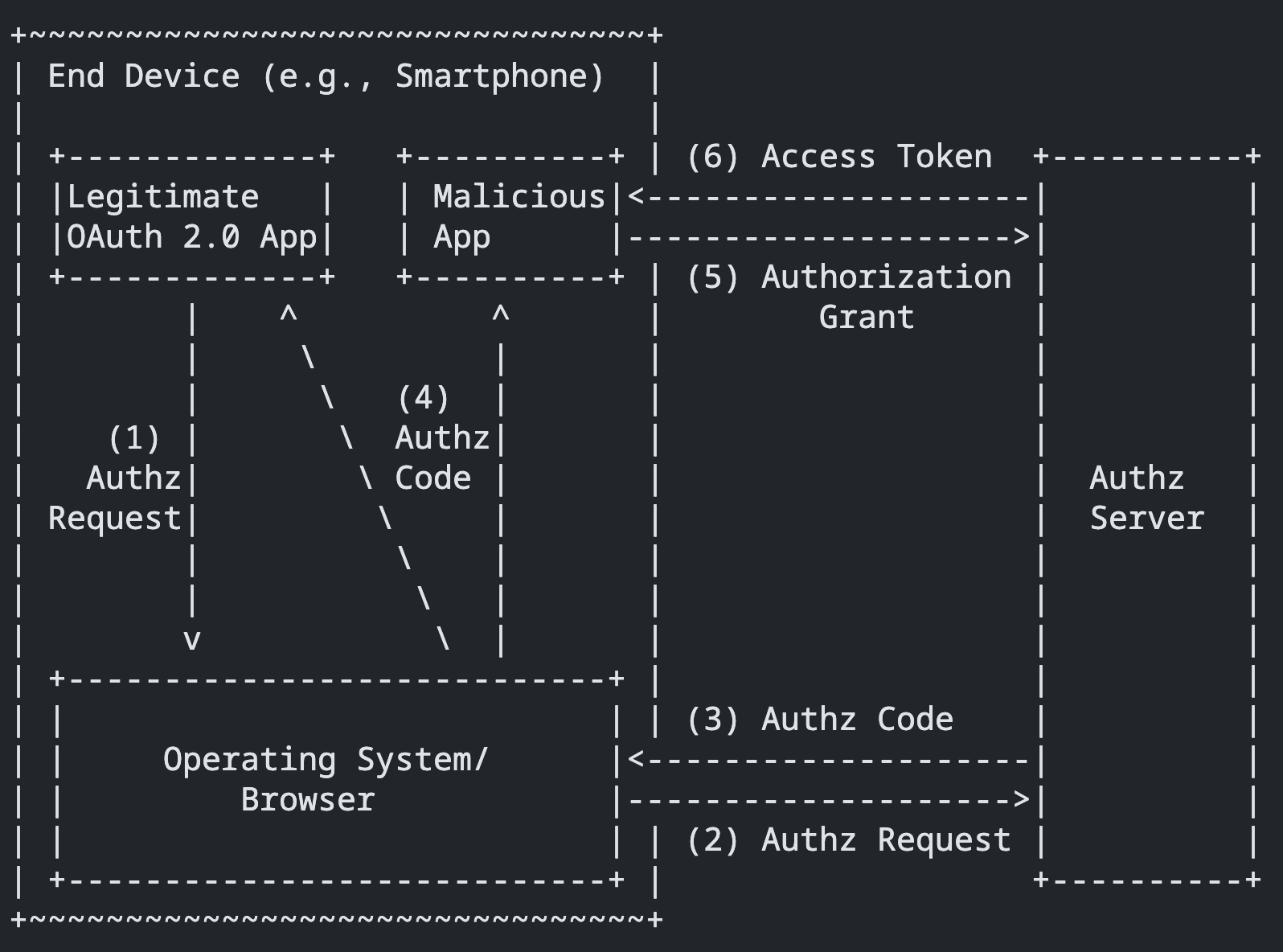
Source: adapted from Figure 1, “Authorization Code Interception Attack,” in RFC 7636.
At this point, you might ask: why do we need PKCE if we already have things like client_secret_basic and client_secret_post?
The reason is that PKCE mainly solves a problem for public clients, and public clients cannot safely store a client_secret. The original RFC 7636 motivation focused heavily on native-app scenarios where a malicious app could intercept the authorization code through a custom URI scheme.
PKCE Flow
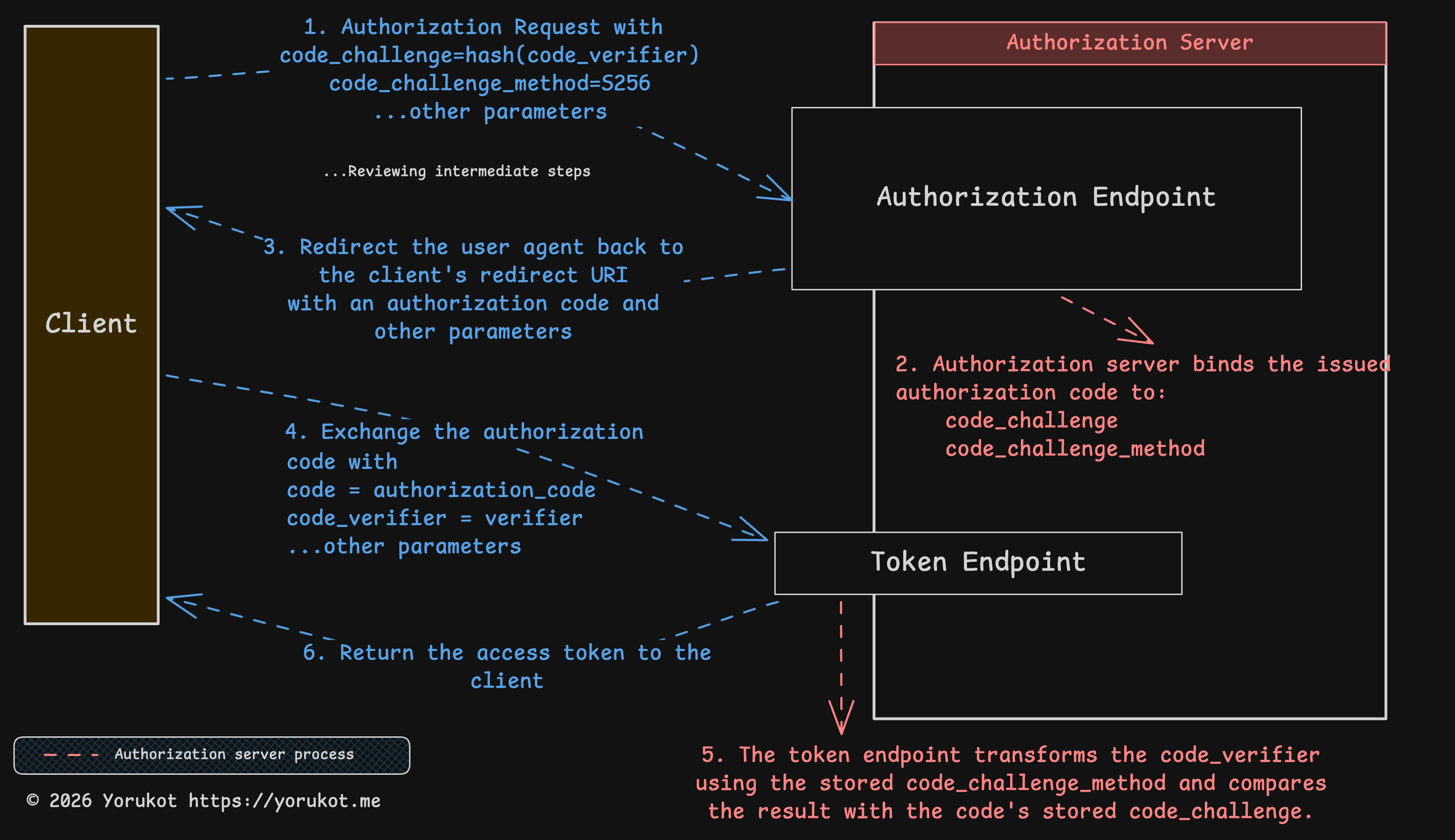
I also attached the Excalidraw file for this diagram here: oauth-flow.excalidraw. You can open it in Excalidraw and edit it if you want.
PKCE adds a proof step to the flow.
code_verifier
The code_verifier is a high-entropy cryptographically random string generated by the client. RFC 7636 requires it to use unreserved URI characters and be between 43 and 128 characters long.
Reference: Section 4.1 of RFC 7636
code_challenge_method
The code_challenge_method tells the server how the client transforms the code_verifier into a code_challenge.
The method can be S256 or plain. With S256, the challenge is BASE64URL-ENCODE(SHA256(ASCII(code_verifier))). With plain, the challenge is just the code_verifier itself. If the client supports S256, it must use S256, and in modern systems you should avoid plain unless there is a very specific compatibility reason.
Reference: Section 4.2 of RFC 7636
code_challenge
The code_challenge is the value derived from the code_verifier. The exact transformation depends on the code_challenge_method.
Reference: Section 4.2 of RFC 7636
1-3. Authorization Request
PKCE extends the original authorization request with new parameters such as code_challenge and code_challenge_method.
GET {authorization_endpoint}?
  response_type=code
  &client_id={client_id}
  &redirect_uri={redirect_uri}
  &scope={scope}
  &state={state}
  &code_challenge={code_challenge}
  &code_challenge_method=S256
After the client sends the code_challenge to the authorization server, the server generates an authorization_code and associates it with that challenge. Later, during the token exchange, the server can verify that the same client is presenting the matching proof.
At the end of this step, the server sends the authorization code back to the client.
4-6. Token Endpoint
After the client receives the authorization code, it sends the original code_verifier to the token endpoint.
POST {token_endpoint}
Content-Type: application/x-www-form-urlencoded

grant_type=authorization_code
&code={code}
&redirect_uri={redirect_uri}
&client_id={client_id}
&code_verifier={code_verifier}
At the token endpoint, the server applies the stored code_challenge_method to the code_verifier and checks whether the result matches the original code_challenge associated with that authorization_code.
If it matches, the server can issue the access_token and, optionally, a refresh_token. If it does not match, the token endpoint must return invalid_grant.
Do I Really Need PKCE?
PKCE is part of current best practice, as described in RFC 9700. In practice, you should treat it as the default. For public clients, it is required by current best practice. For confidential clients, it is still recommended because it adds protection against authorization code interception and injection scenarios.
Summary
OAuth is a complicated authorization framework. Even in this article, I skipped a lot, especially PKCE details, OpenID Connect, token introspection internals, and many of the newer security recommendations.
Still, the core idea is simple: do not hand your password to every third-party app that wants your data. Instead, let an authorization server issue limited tokens with limited scope.
That said, OAuth is complicated enough that people misuse it all the time. The most common example is treating OAuth itself like an authentication framework. OAuth is about authorization. Access tokens are meant for resource access, not as proof that the user authenticated to the client. If you want a standard layer for identity, that is usually where OpenID Connect (OIDC) comes in.
If you spot anything wrong in this article, email me at hi@yorukot.me. I will fix it as soon as I can.
References
- RFC 5849 - The OAuth 1.0 Protocol
- RFC 6749 - The OAuth 2.0 Authorization Framework
- RFC 6750 - The OAuth 2.0 Authorization Framework: Bearer Token Usage
- RFC 7591 - OAuth 2.0 Dynamic Client Registration Protocol
- RFC 7636 - Proof Key for Code Exchange by OAuth Public Clients
- RFC 8252 - OAuth 2.0 for Native Apps
- RFC 8414 - OAuth 2.0 Authorization Server Metadata
- RFC 7662 - OAuth 2.0 Token Introspection
- RFC 9700 - Best Current Practice for OAuth 2.0 Security
- OAuth Working Group Documents
- draft-ietf-oauth-v2-1 - The OAuth 2.1 Authorization Framework